 TwinTab
Duplicate the active tab in one keystroke.
TwinTab clones whatever tab you're on, instantly. No menus, no right-click, no mouse — just a keyboard shortcut.
Built for speed, nothing else
A single-purpose extension that stays out of your way.
Instant clone
Duplicate the active tab in milliseconds — same URL, same place in your tab strip.
Keyboard-first
Designed for users who never want to take their hands off the keyboard.
Zero data collected
No tracking, no analytics, no network requests. Your browsing stays yours.
Always free
No accounts, no paywalls, no ads. Install once and forget about it.
See it in action
A tiny popup with everything you need — and nothing you don't.
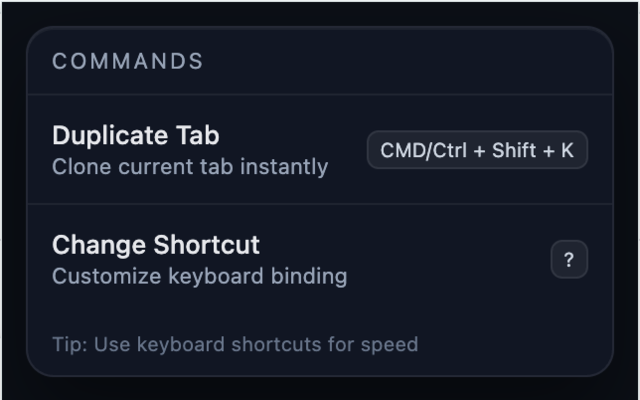
The command panel
One command, one shortcut. That's the whole interface.
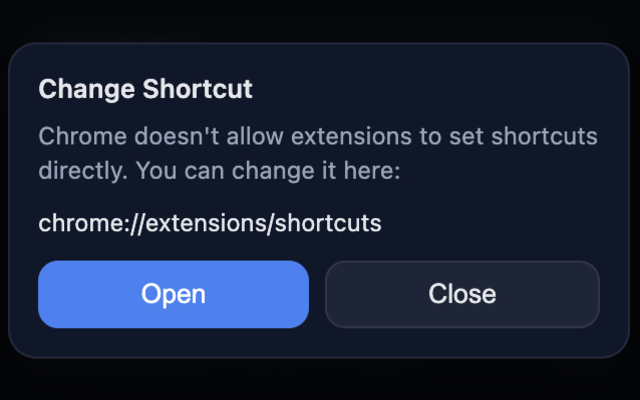
Customize your shortcut
Chrome controls extension shortcuts — TwinTab links you straight to the right page.
Get going in 30 seconds
Three steps and you're set.
Install TwinTab
Add the extension from the Chrome Web Store. No sign-up required.
Press the shortcut
Hit ⌘/Ctrl + Shift + K on any tab to clone it.
Rebind if you like
Open chrome://extensions/shortcuts to change the binding to anything you want.
Ready to twin your tabs?
Free forever. No data collected. Just a faster browser.
Add TwinTab to ChromeMade by
A solo project, built with care.